Faced with the laborious task of transferring hundreds of videos from AWS/S3 to Canvas Studio, Stephen Ogden, Head of Learning Technology, chose to embrace a strategic form of “laziness”: automating the process through the Canvas Studio API. In this post, Stephen shares the technical solution he developed and the lessons learned from balancing clever shortcuts with necessary attention to detail. It’s a candid reflection on the difference between cutting corners and cutting through inefficiency.
Last week I needed to take 554 videos hosted on AWS/S3 and transfer them to Studio. (With potentially many thousands more to do in the coming months.)
The idea of downloading each video and then uploading triggered my “I’m too lazy for that” nerve.
It was time to delve into the Studio API.
With recent success using the Canvas API, I was not daunted… though I was set back briefly with a different API token process in Studio as compared with Canvas (but that’s a half-hearted whinge for another time). After building a web-app that handles authentication and key cycling, I was soon able to build out the functionality to bulk upload videos:
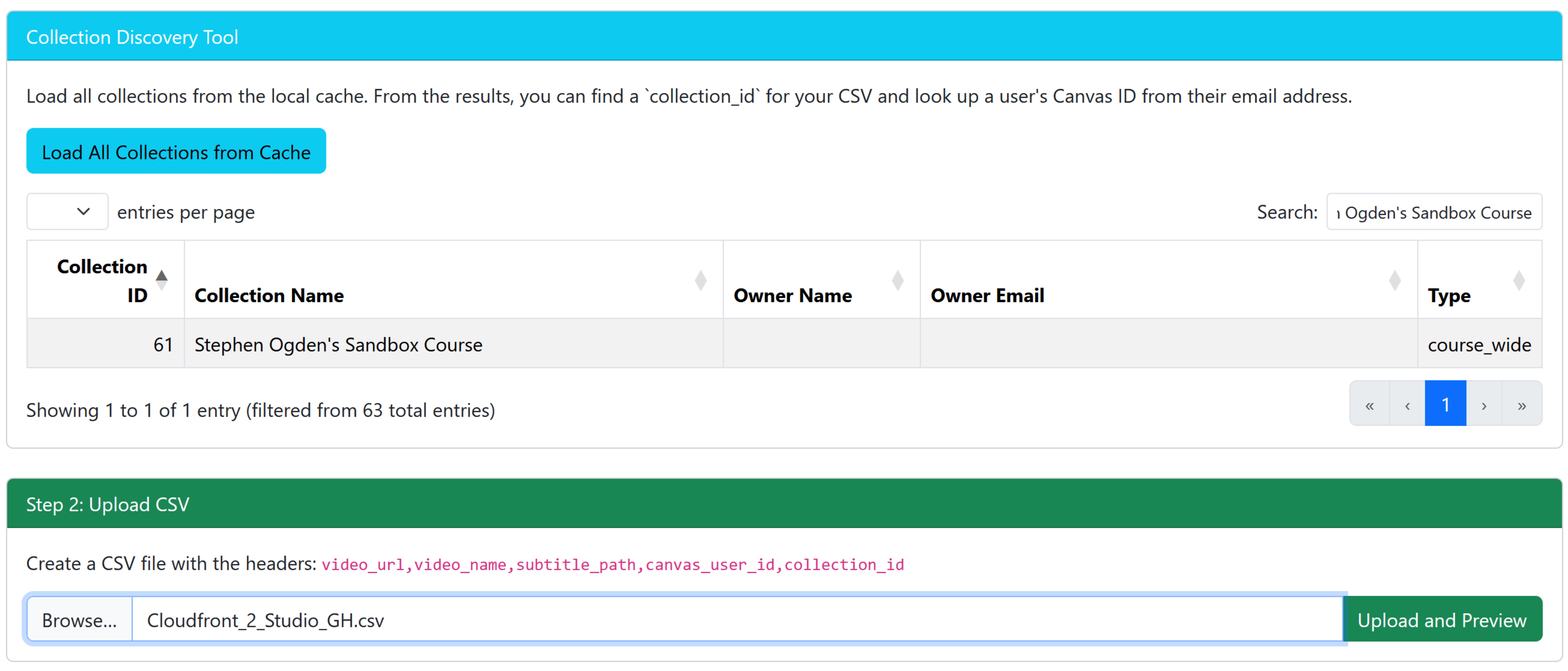
My web app takes a CSV file of video URLs (as well as caption URLs and user and collection IDs) and will then instruct Studio to download the videos straight in, so as to bypass the need for me to download them.
The Studio APIs need you to know the ID numbers of users the videos should belong to, and the ID number of the collections the videos should be placed in. I added functionality to my web app to make these IDs discoverable, and also to be able to bulk update this data after uploading the CSV just in case you didn’t have that data to hand when making the CSV file in the first place.
Pushing the button ‘send to processing queue’ sends all of the CSV data to a database where it can be picked up by a serverside task which runs every 5 minutes checking for jobs and when it finds any, makes the relevant API calls.
Half a day (maybe a very long half of a day!) of writing a web app, 5 minutes of using the web app, followed by 3 hours of doing something completely different while the videos all transferred in the background certainly beats DAYS of downloading and uploading videos through front ends. This is the correct application of laziness from the title.
A refusal to surrender one’s will to a time consuming task and as a result building a more efficient process.
However, providing myself a means to specify exactly which user and collection the videos should end up in, didn’t stop me from putting the same user and the same collection for ALL VIDEOS. That’s ok, I told myself, I’ll save myself a few seconds now and after they all upload I can just move them into the 10 different course collections they need to end up in, and any of the teachers of those courses that need them can embed them where they need them to be.
When one is ignorant of a thing, one doesn’t know what one needs to know.
But most assuredly when one assumes functionality, one should expect to get burnt.
Studio videos don’t really belong in course collections, and cannot be moved from one course collection to another. They also cannot be transferred from one user to various other users. Lessons learnt the hard way do seem to stick better, though I’m not appreciating that right now.
Picture me, slowly creating new user collections, moving videos (20 at a time) from my default collection into appropriately named collections, then sharing those collections with the other users that need them. Many, many, many MINUTES of work that would have been unnecessary if I’d taken the extra few seconds to specify in my CSV or web app which videos were intended for which destinations. And here the secret subtitle of this piece, for with every correct application of laziness there are plenty of incorrect applications. Often embedded and hidden inside each other. It is the duty of the lazy to know the difference for otherwise they will be punished. Not just unnecessary additional work, but something much worse…
no-one else to blame it on but themselves!
Next time you have a large volume of work, take a moment to be lazy, don’t rush in. There is almost always an optimisation to be found. If you do find one, stop, spend a little longer being lazy, there’s often another optimisation!