

In my previous post, I looked at the process and pedagogy behind building an educational simulation with ChatGPT and Codex. One of the clearest lessons from that work was that making a simulation easier to build does not make it easier to design well.
This post introduces seven practical questions for designing pedagogically purposeful learning simulations. They are intended as a simple framework for helping you plan or review a simulation, with a focus on whether each element is serving the learning. I developed the framework for a CROPSNet conference workshop, where I needed a straightforward way to help participants turn an initial idea into something they could begin designing. In distilling what I had learnt from building Senate Technologies, I found myself coming back to seven questions:
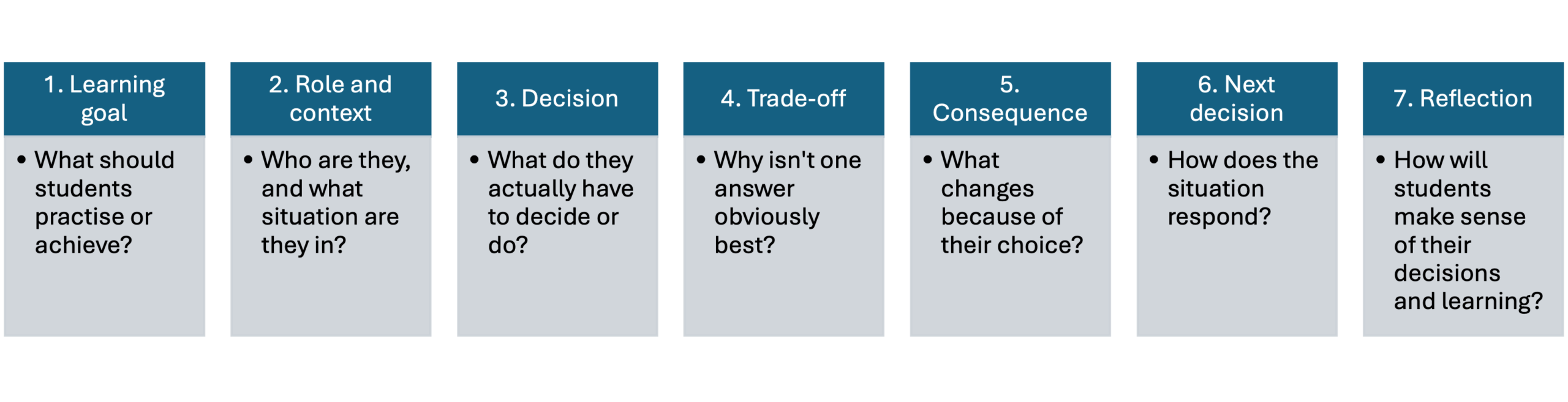
The sections below explore each question in turn, with practical examples and design tips.
1. Learning goal
The starting point is the learning goal. A simulation is most useful when students need to apply knowledge, exercise judgement, evaluate information or make decisions in context, particularly where there is uncertainty or more than one defensible course of action. Other learning goals, such as understanding a concept or practising a calculation, may be supported just as effectively through more conventional activities.
Some of my early experiments with Codex were technically impressive, but pedagogically they were little more than elaborate multiple-choice questions. Students were clicking through an attractive interface, but the underlying task could have been achieved just as effectively with a quiz.
I therefore went back to the learning outcomes and asked what students actually needed to do. The simulation did not need to reproduce everything they had learnt, only the parts that benefited from students acting, making choices and seeing what happened as a result.
That became a useful test throughout development: what does the simulation allow students to practise that another learning activity would not?
2. Role and context
Role and context give students a reason to act. They help move the activity away from an isolated academic exercise and towards the way knowledge might be used in professional practice. This operates at two levels: the learner’s overarching role in the simulation and the specific situation surrounding each task. In my case, students act as financial advisers to the board of a technology company, making decisions about how the finance function should respond to different challenges.
For each part of the simulation, I asked what was happening and why the student needed to act. I did not want the experience to feel like a series of calculations dressed up with graphics. Each task needed a purpose within the wider story.
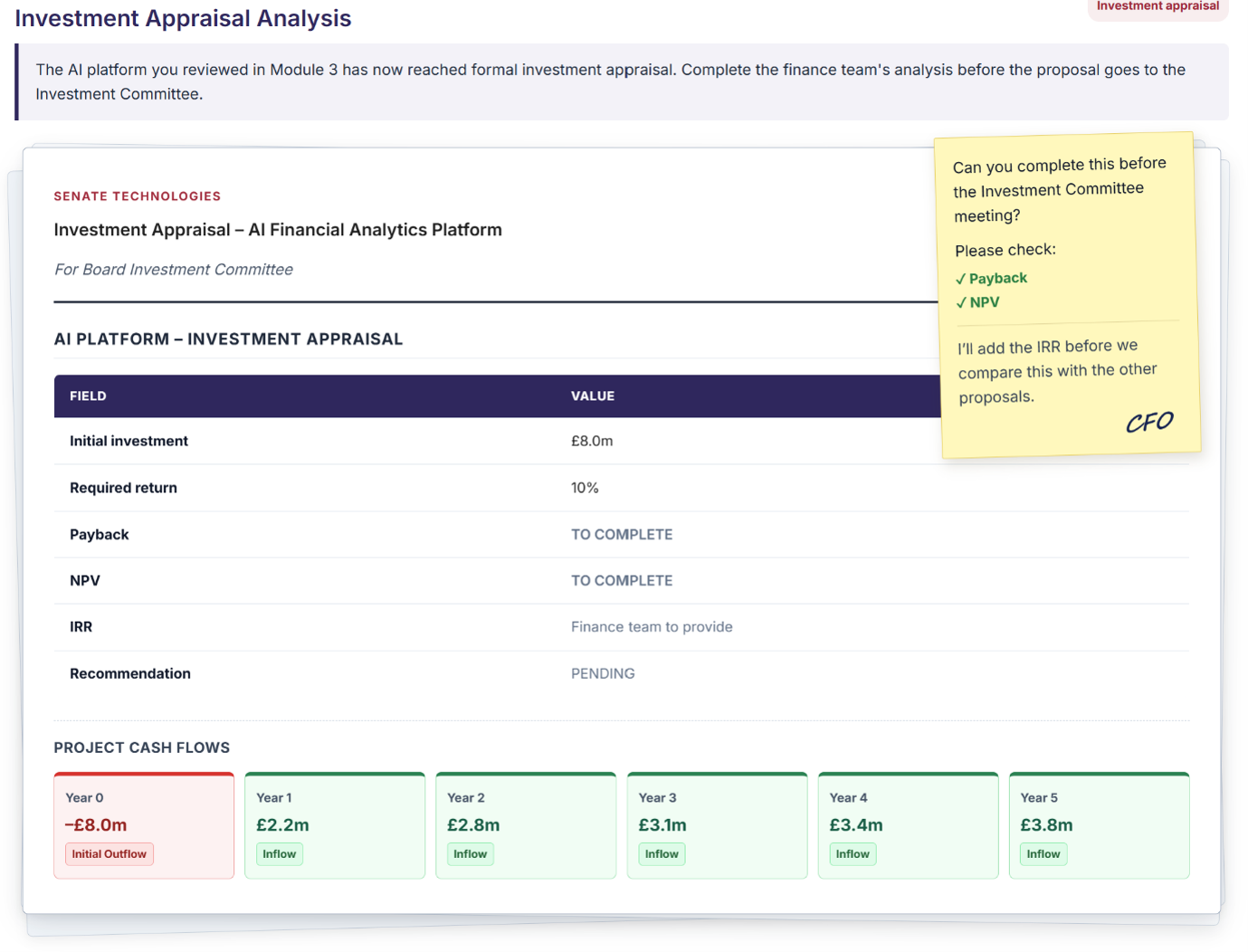
Across several topics our fictitious company, Senate Technologies, is considering investment in an AI platform. Students revisit the proposal at different stages, using different appraisal techniques to build up their view of whether it should proceed. Within one topic, an Investment Committee meeting is approaching and the CFO asks them to complete part of the appraisal beforehand.
The calculation has not changed, but the context gives it a professional purpose. Authenticity can also come from how information is presented: through emails, team messages, board papers, meeting discussions or phone call transcripts.
3. Decision
The decision is where students move from receiving information to doing something with it. In a learning simulation, this should ideally involve more than recalling the correct answer: it is an opportunity to apply knowledge, evaluate information, exercise judgement and make a choice that they can justify. The role and narrative create the situation, but the decision is where much of the higher-level thinking happens.
It is worth thinking not only about what students are deciding, but how they interact with the simulation to make that decision. In my early experiments, Codex tended to fall back on multiple-choice questions, often with a fairly clear right and wrong answer. There is nothing inherently wrong with multiple choice, but using it for every decision quickly made the simulation feel repetitive and limited the kinds of judgements students could make.
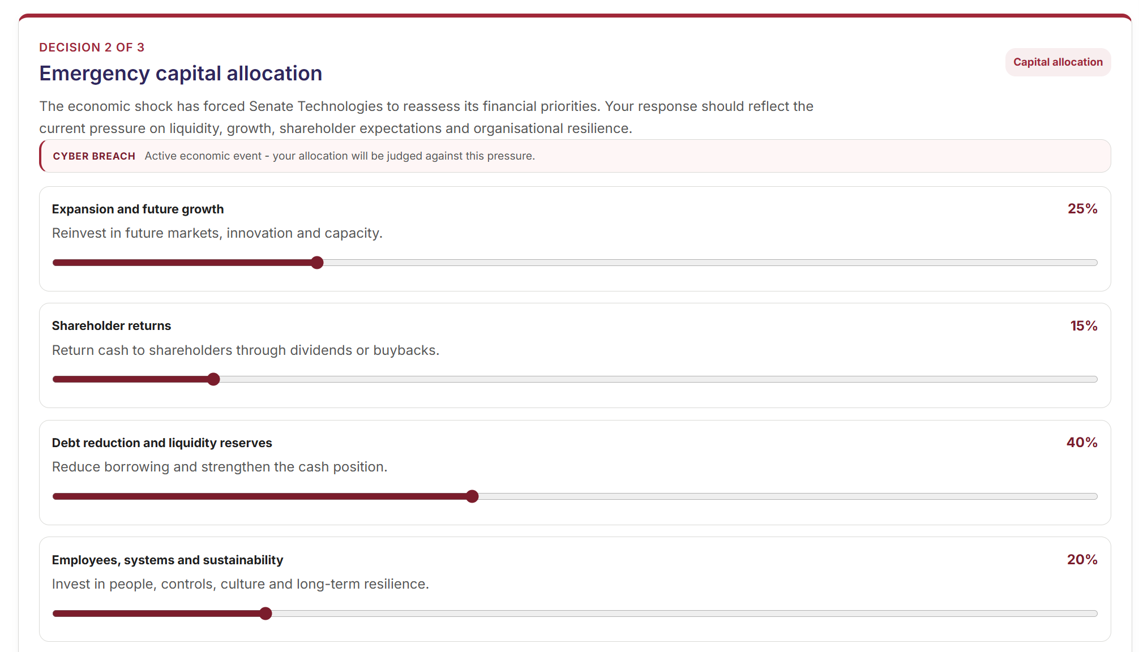
As the simulation developed, I used a wider range of interactions: sliders, budget allocations, numerical inputs, drag and drop, investment selection and negotiation. In some cases, graphs changed as students adjusted their inputs, allowing them to explore the implications before committing to a decision.
The variation was not just about engagement. Different interactions can support different kinds of thinking: sliders can represent a spectrum, allocations make scarcity visible and numerical inputs can support calculation or negotiation. The interaction should follow the decision, not lead it.
4. Trade-off
A meaningful simulation decision should require judgement. If one option is clearly better than the others, students are mostly identifying the correct answer. A genuine trade-off asks them to compare competing priorities, evaluate consequences and justify the compromises involved in their choice. This is where the simulation can support critical thinking and professional judgement.
For each decision, I found it useful to ask what each option offers and what it costs. In one topic, students have a fixed £2m budget to allocate across four priorities. Putting more money into one area necessarily leaves less elsewhere: greater protection against downside risk, for example, may mean giving up potential growth.
The interaction can help make that trade-off visible too. Fixed budgets, sliders and live graphs can show students that improving one outcome may weaken another. This makes the compromise part of the experience, not just something described in the accompanying text.
5. Consequence
A decision only feels meaningful if something changes as a result. Consequences help students connect their judgement with its effects and also create an opportunity for timely feedback. This is particularly important in online learning where students may be working independently.
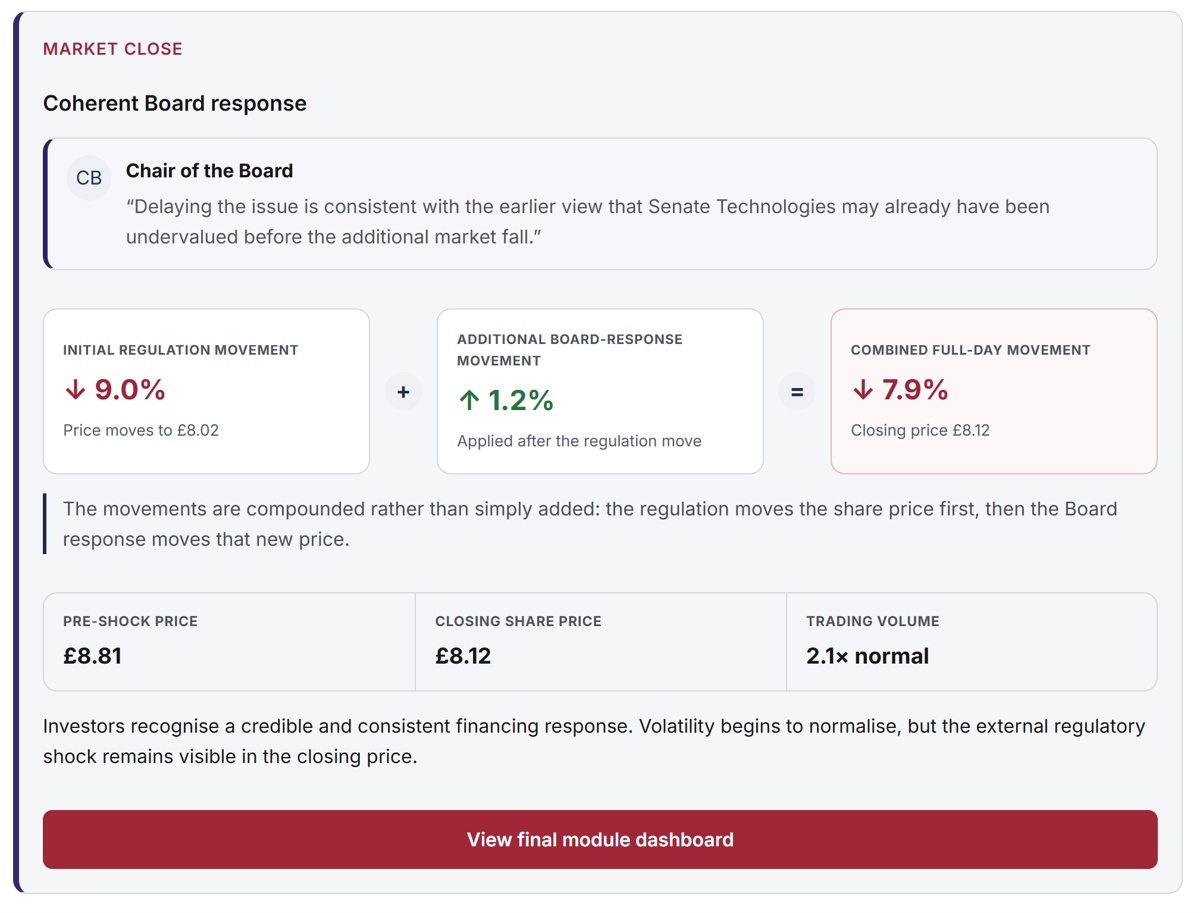
I used several layers of feedback. A live dashboard shows how decisions affect measures such as cash, gearing and investor confidence, while explanatory feedback helps students understand why those measures have changed. Board members and other stakeholders can also provide different perspectives on the same choice.
The aim is to help students understand the consequences of their judgement without reducing every decision to right or wrong.
6. Next decision
One of the advantages of a simulation is that the situation does not have to remain static. Students can make a decision, see what happens and then be asked to respond again as circumstances change. This creates a closer approximation of decision-making in practice, where new information can alter the problem you thought you were solving.
A useful way to create the next decision is to introduce new information, a constraint or an unexpected event after the student has already acted.
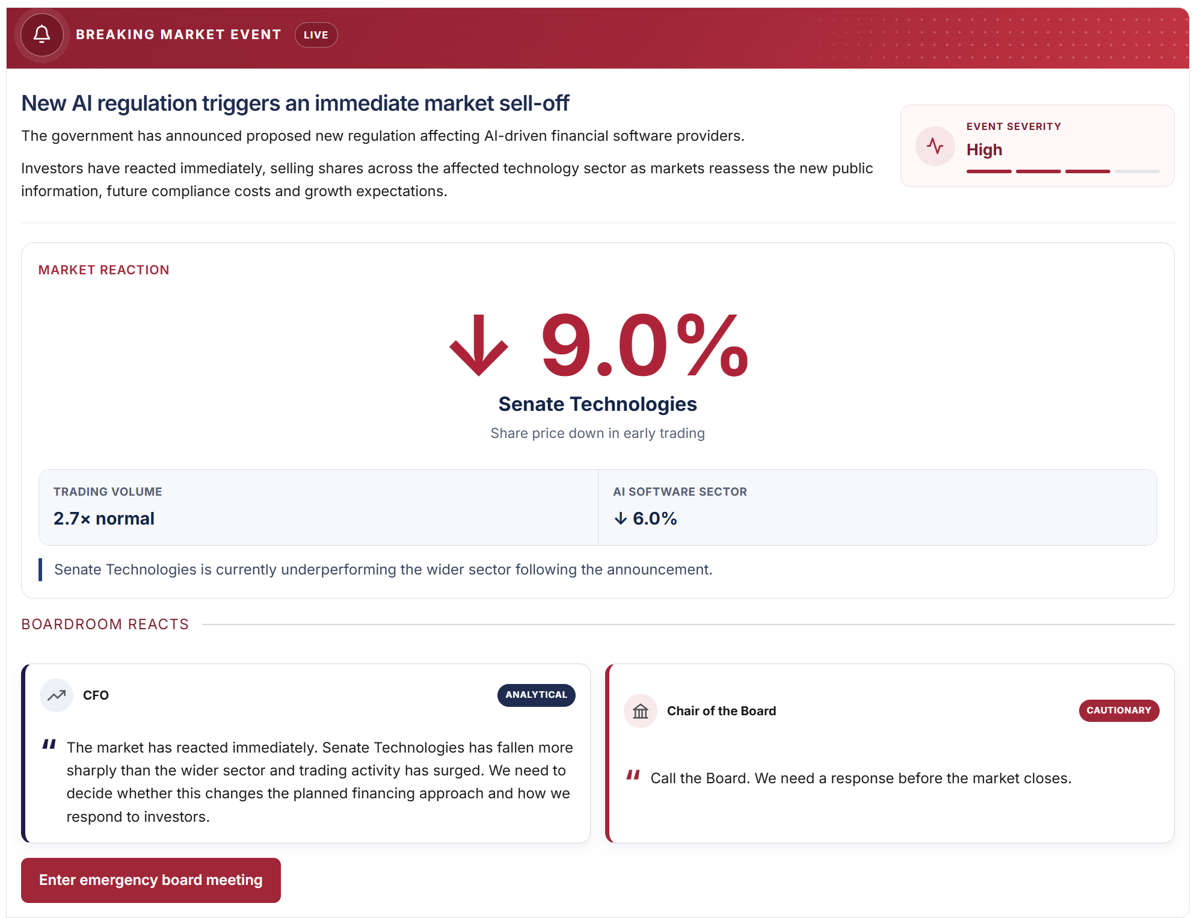
I used breaking market events for this. For example, students might form an initial view of Senate Technologies’ financial position, only for a government announcement on AI regulation to trigger a sudden market decline. They then have to decide how to respond to the new conditions. The second decision therefore builds on the first, but the context has changed.
The same principle could be applied through a new constraint, stakeholder demand, competitor action or change in market conditions.
7. Reflection
Reflection helps students turn the experience of the simulation into learning. Making a decision and seeing its consequences is valuable, but students also need opportunities to link that experience back to the theory, consider why they made a particular choice, evaluate the evidence they used and recognise the trade-offs involved.
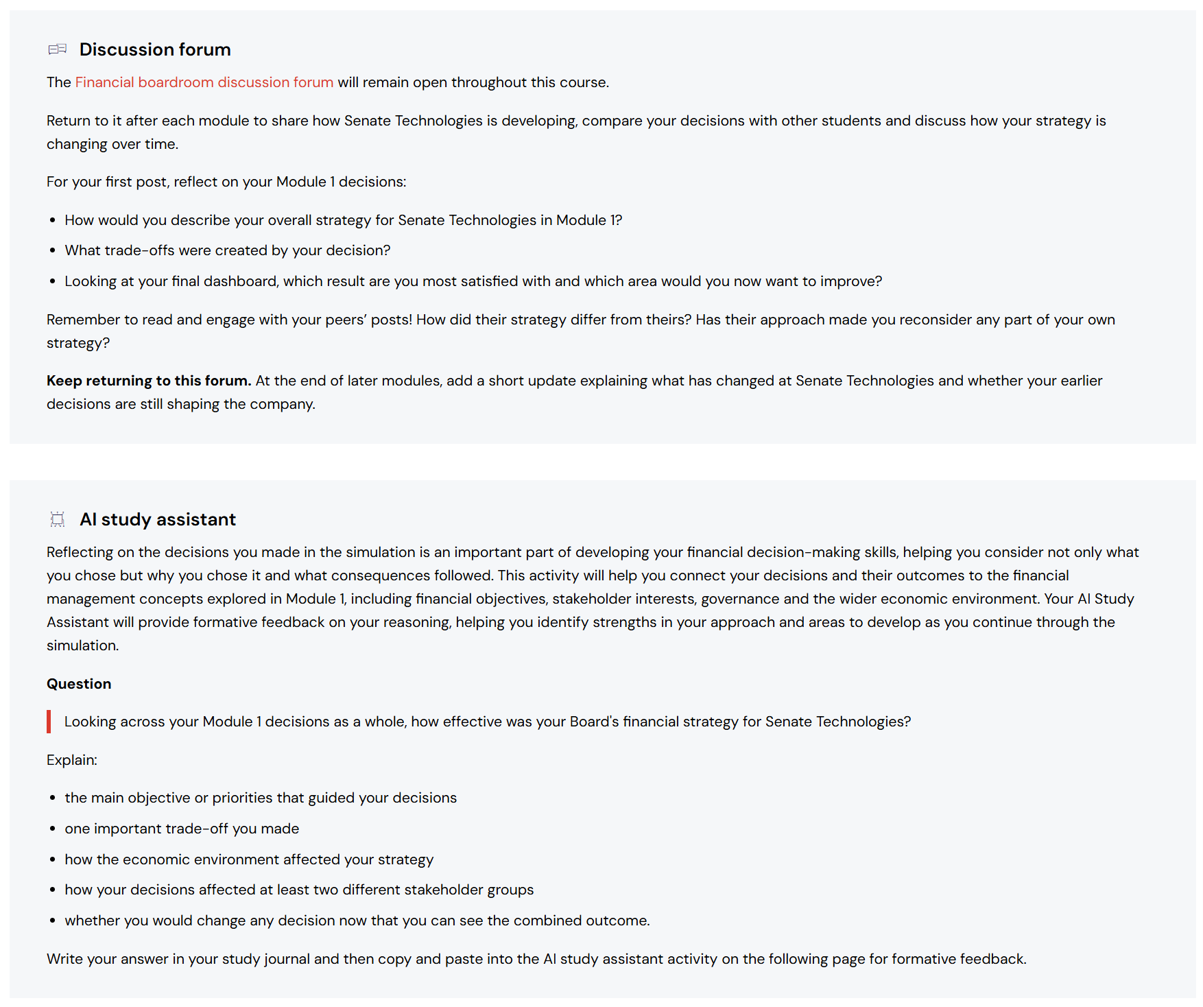
Students are given opportunities to reflect on their decisions through the discussion forum and with the AI Study Assistant, where they can explain how the concepts and techniques they have studied informed their judgement and receive feedback on their reasoning.
The aim is to move beyond asking whether the outcome was good or bad. Reflection helps students connect what happened in the simulation with what they have learnt, making the relationship between theory, judgement and professional practice more explicit.
Conclusion
What I found most useful about this framework is that it shifted the focus away from ‘building a simulation’ and towards designing the learning experience within it. It may not work for every context, but it is a useful reminder that the aim is not technical complexity for its own sake. It is to create something pedagogically purposeful, where the technology supports the thinking, decision-making and reflection we want students to engage in.
If you are designing a new simulation, or reviewing one you already have, the seven questions can provide a practical starting point for checking whether each part of the experience is contributing to the learning. Used in that way, they help keep the focus on the pedagogy first, with the technology there to support it.
Chess photo by Kara Carelle on Unsplash